
For many older adults, a mobile phone is far more than just a way to chat—it is an absolute lifeline. Whether it’s participating in telehealth appointments, connecting with grandchildren across the country, or having a reliable way to call 911 during a medical emergency, staying connected is a matter of health and safety.
However, with inflation and rising living costs, adding an expensive monthly cell phone bill to a fixed retirement income is often impossible. If you are searching for how to get a free phone for seniors, you are in the right place.
Important Update for 2026: You may have heard about the Affordable Connectivity Program (ACP). Please note that the ACP officially ended in 2024. Today, the Lifeline program is the primary federal assistance program providing a government-free phone for seniors. Furthermore, the FCC recently tightened identity verification rules in 2026 to prevent fraud, requiring stricter proof of identity for the application process.
This comprehensive guide explains what the Lifeline program is, who qualifies, how to protect yourself from scams, and where to get a free government phone for seniors in your state.
Why a Reliable Mobile Phone is Crucial for Seniors
Before diving into the application, it is important to understand why applying for this benefit is so vital. A free cell phone plan for seniors does more than save money; it improves quality of life:
- Telehealth Access: Many doctors now require patients to use smartphone apps or video calls for routine check-ups and prescription refills.
- Combating Isolation: Studies show that seniors who maintain daily contact with family via voice calls or text messages experience significantly lower rates of depression.
- Emergency Preparedness: Landlines are becoming obsolete. A mobile phone ensures that if you suffer a fall or a medical emergency away from home, help is just a button press away.
What is the Federal Lifeline Program?
Lifeline is a long-standing government benefit program administered by the Federal Communications Commission (FCC) and the Universal Service Administrative Company (USAC). Its primary goal is to ensure that low-income households have access to basic, essential communication services.
What You Actually Get in 2026: Depending on the specific telecommunications provider you choose, a Lifeline benefit typically provides one of two things:
- A Free Phone & Plan: A free device (usually a basic Android smartphone or an accessible flip phone) bundled with a monthly allowance of free minutes, text messages, and mobile data (the FCC mandates a minimum of 4.5GB of data per month until December 2026).
- A Bill Discount: If you already have a phone and a plan you like, you can apply a $5.25 to $9.25 monthly discount to your existing cellular or landline bill.
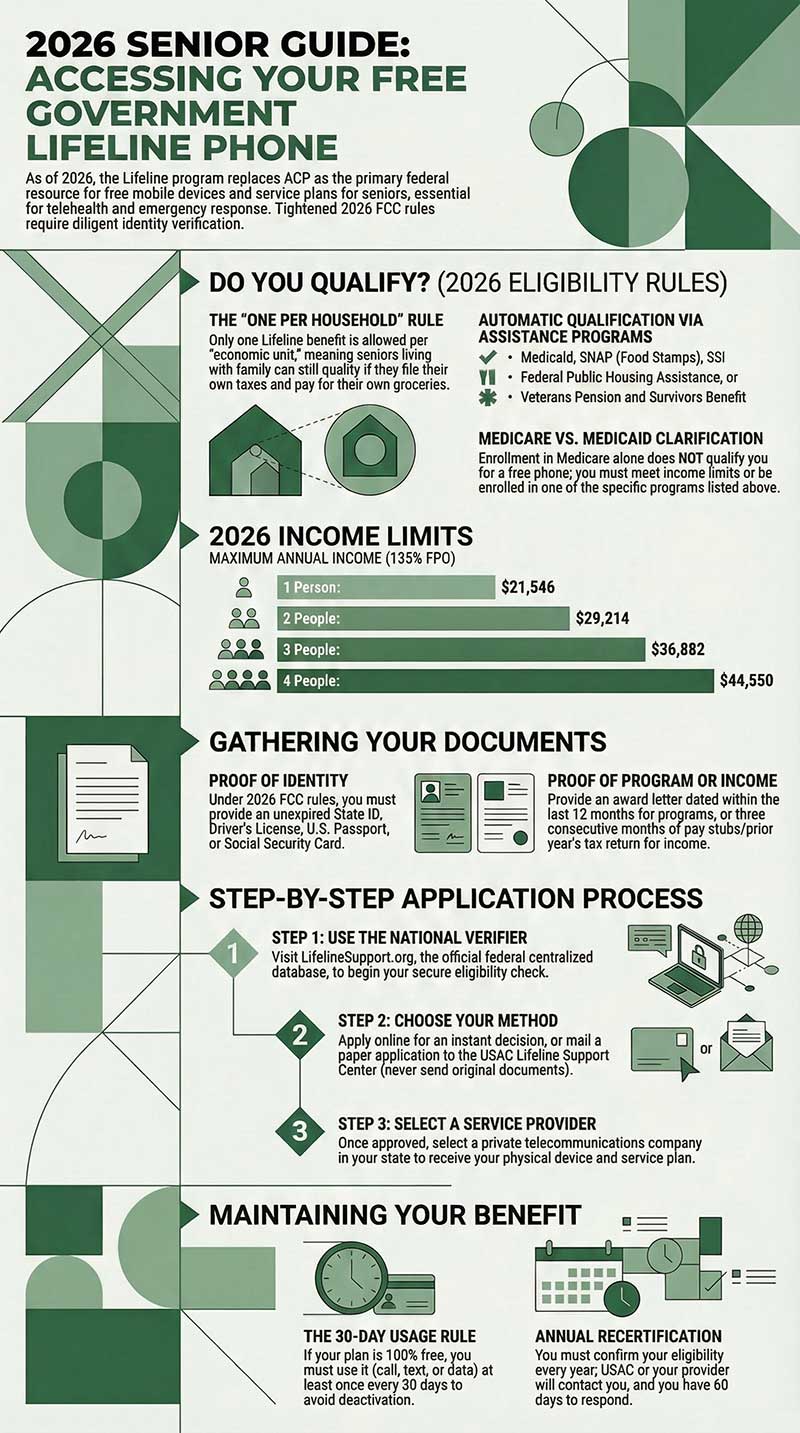
The “One Per Household” Rule: The government strictly enforces a “one per household” limit. However, a “household” is defined as an economic unit. If you are a senior living with your adult children, but you file your own taxes and pay for your own groceries, you are considered an independent economic unit and can legally apply for your own Lifeline benefit.
How to Qualify Free Government Phone For Seniors (2026 Eligibility Rules)
There are two main ways to qualify for the program: either by participating in a qualifying government assistance program or by meeting specific income limits. You only need to meet one of these criteria.
1. Qualifying Through Government Assistance Programs
If you receive benefits from any of the following, you are automatically eligible:
- Medicaid
- Supplemental Nutrition Assistance Program (SNAP / Food Stamps)
- Supplemental Security Income (SSI)
- Federal Public Housing Assistance (FPHA / Section 8)
- Veterans Pension and Survivors Benefit
Crucial Clarification: Many older adults mistakenly search for a Medicare free phone for seniors. It is vital to know that Medicare alone does not qualify you for Lifeline. You must be enrolled in Medicaid, a qualifying program above, or meet the specific income brackets outlined below.
2. Qualifying Through Income Limits
If you do not receive the federal benefits listed above, you can still qualify if your total gross household income is at or below 135% of the Federal Poverty Guidelines.
Below are the official 2026 Lifeline income limits for the 48 contiguous states and Washington, D.C.
|
Household Size |
Maximum Annual Income (135% FPG) |
|---|---|
|
1 Person |
$21,546 |
|
2 People |
$29,214 |
|
3 People |
$36,882 |
|
4 People |
$44,550 |
Note: If you live in Alaska or Hawaii, the maximum income limits are slightly higher to account for the cost of living.
Gathering Your Documents (New 2026 Verification Rules)
Because the FCC has cracked down on application fraud in 2026, you cannot simply state your income—you must prove it. Gather these documents before starting your application:
- Proof of Identity (Must be living and lawful): Unexpired State ID, Driver’s License, U.S. Passport, or Social Security Card.
- Proof of Program Participation: Your official Medicaid card, SNAP award letter, or Veterans Pension statement (dated within the last 12 months).
- Proof of Income: Prior year’s tax return, three consecutive months of pay stubs, or a Social Security/Pension benefits statement.
Step-by-Step: The Application Process
Applying for these benefits is completely free. You should never pay a fee to submit a Lifeline application. Here is the safest and most direct way to get approved under the new 2026 federal guidelines.
Step 1: Use the National Verifier
The National Verifier is the official, centralized database maintained by the federal government to verify Lifeline eligibility. You can access it securely by visiting the official website: LifelineSupport.org.
Step 2: Choose Your Application Method
- Apply Online: This is the fastest method. Create an account on the National Verifier website, upload photos of your proof documents, and often receive an approval decision within minutes.
- Apply by Mail: If you are not comfortable applying online, you can print a paper application from the LifelineSupport website. Mail it to the USAC Lifeline Support Center along with copies (never send the originals) of your documents.
- Apply Through a Provider: Many people find it easiest to apply directly through a participating telecommunications company, such as Assurance Wireless [Internal Link: Assurance Wireless Free Phone Guide]. These companies have systems that let you submit your National Verifier application while also signing up for their specific phone service.
Step 3: Select a Telecommunications Provider
The government determines your eligibility, but they do not mail you the physical phone. Once approved, you must choose a participating private phone company in your state to receive your device. To help you choose, we have reviewed the top providers in our guide to the best free cell phone service for seniors.
Important State-Specific Exceptions (2026 Updates)
While the National Verifier manages applications for the majority of the country, a few states manage their own Lifeline programs and have completely separate application portals.
If you live in Texas, Oregon, or California, you will need to apply through your state’s specific system.
- California Residents (Crucial 2026 Update): The California Lifeline program often has income limits much higher than the federal standard. Furthermore, as of February 2026, California residents must complete two separate enrollments (one for state and one for federal) to receive the maximum combined discount. [Internal Link: California Free Phone Guide]
- Texas Residents: [Internal Link: Texas Free Phone Guide]
- Illinois Residents: [Internal Link: Illinois Free Phone Guide]
How to Keep Your Free Phone Active (Usage & Renewal Rules)
Getting the phone is only half the process; you also have to maintain the benefit. The FCC has strict rules to prevent waste in the program.
- The 30-Day Usage Rule: If your service is completely free, you must use your phone at least once every 30 days. Making a call, sending a text, or using mobile data off Wi-Fi counts as usage. If you leave the phone in a drawer for more than 30 days, your service will be deactivated.
- Annual Recertification: To keep your free phone active year after year, you must recertify your Lifeline eligibility annually. Your provider or USAC will contact you when it is time to recertify. You typically have 60 days to respond with proof that you still qualify, or you will lose your service.
What If You Don’t Qualify for Lifeline?
If your income is slightly above the 135% poverty line or you do not receive Medicaid, you will be denied federal assistance. However, you still have highly affordable options.
Many budget carriers cater specifically to seniors on fixed incomes. Instead of paying $80 a month to a major carrier, look into prepaid services like Consumer Cellular (which offers AARP discounts), Mint Mobile, or Tello, where reliable talk and text plans can cost as little as $10 to $15 a month.